
▶ Video Portfolio view (0:55) · all videos
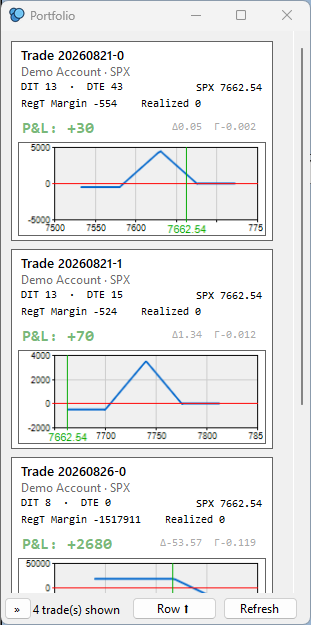
Portfolio is a book-wide dashboard: one tile per trade, across every symbol and account, each showing a P&L summary, RegT-style Margin, Greeks, and a small expiry-payoff chart. Open it from the Trades menu → Portfolio, or press Alt+K.
Related:
Portfolio only ever shows trades it considers currently relevant to your book:
Archived, orphaned, and expired-pending-settlement trades never appear here — see the Trade List Guide for those states.
Each tile shows, top to bottom:
Click anywhere on a tile to open or focus that trade's OA — see below.
Portfolio never leaves a figure blank, but it's honest about how confident each one is:
The approximation is always RegT-style, even for a Portfolio Margin/PM account — real PM margin needs a heavier calculation Portfolio doesn't currently run independently.
Hover over a tile's P&L or Greeks to see which kind of number you're looking at.
The left panel has a symbol dropdown (defaults to "All symbols") and an account checklist (every account checked by default). Uncheck an account to hide its trades, or pick one symbol to narrow the view to just that underlying. Both filters combine — e.g. pick a symbol and uncheck an account to see only that symbol's trades in your remaining accounts.
Your checked-account selection is remembered between sessions.
Both choices are remembered between sessions.
Clicking a tile opens (or brings to front) the Options Analysis window for that exact trade — switching account/symbol first if needed, creating a new OA if none is open yet, and loading its chain automatically. Portfolio then hides itself so the OA has the screen. Reopen Portfolio any time from the Trades menu or Alt+K — it's never actually closed, just hidden, so it reopens instantly with your filters and layout exactly as you left them.
Portfolio refreshes itself automatically every few seconds while open, and also on demand via the Refresh button (bottom toolbar) — useful right after opening/closing an OA elsewhere if you don't want to wait for the next automatic tick.
Settings (Wheel icon) → General Settings → Open Portfolio on startup: when enabled, Portfolio opens automatically once IB connects and the rest of SOAP2's normal startup sequence finishes, at its last remembered position and size. Off by default.
Portfolio remembers its window position, size, and monitor between sessions, correcting itself back on-screen if that monitor is no longer connected. Its row/column layout choice, filter-panel collapsed state, and checked-account selection are remembered the same way.
Why does a trade's Margin/Greeks look different before and after I open its OA? Before, Portfolio is showing its own independent approximation (dimmed); once the OA is open, visible, and its chain has loaded, Portfolio switches to reading the OA's own exact numbers.
Why did a trade's tile disappear? Most likely it's an unmonitored trade whose OA you just hid, minimized, or closed — see Which trades show up. A monitored trade never disappears this way.
Can I see Margin/Greeks for a trade combined with another one in the same OA (via "Add Trade")? Not accurately — a combined OA's summary is a blended total across every trade shown in it, so it can't be split back apart. Both trades' tiles fall back to the approximate figures in that case.
Does Portfolio request any new market data on its own? No — it only reads data already resident from your trades' existing subscriptions (TLog quotes, or an open OA), so opening Portfolio never adds to your IB data usage.
Go back to the main help page: SOAP2 Help Guide