 # Getting Started: Install and Connect
**Level: Standard** • About 10 minutes • Next: [Core Concepts](./core_concepts.md.html)
This page takes you from nothing to a first live Options Analysis window: install SOAP2, set up TWS, connect, and open your first chain.
> **Videos:** [Installing SOAP2](https://www.youtube.com/watch?v=p0qo1rqZm2Y) (0:30) · [IB connection](https://www.youtube.com/watch?v=ew7PEqnJWeg) (0:24) · [SOAP2 first steps](https://www.youtube.com/watch?v=q3gJKk3oNgc) (1:30) · [All videos](./videos.md.html)
---
## Start here (60 seconds)
1. If not done already: install SOAP (or unzip and update/repair with the provided MSI file).
2. Install/launch **IB Trader Workstation (TWS)** (latest stable version).
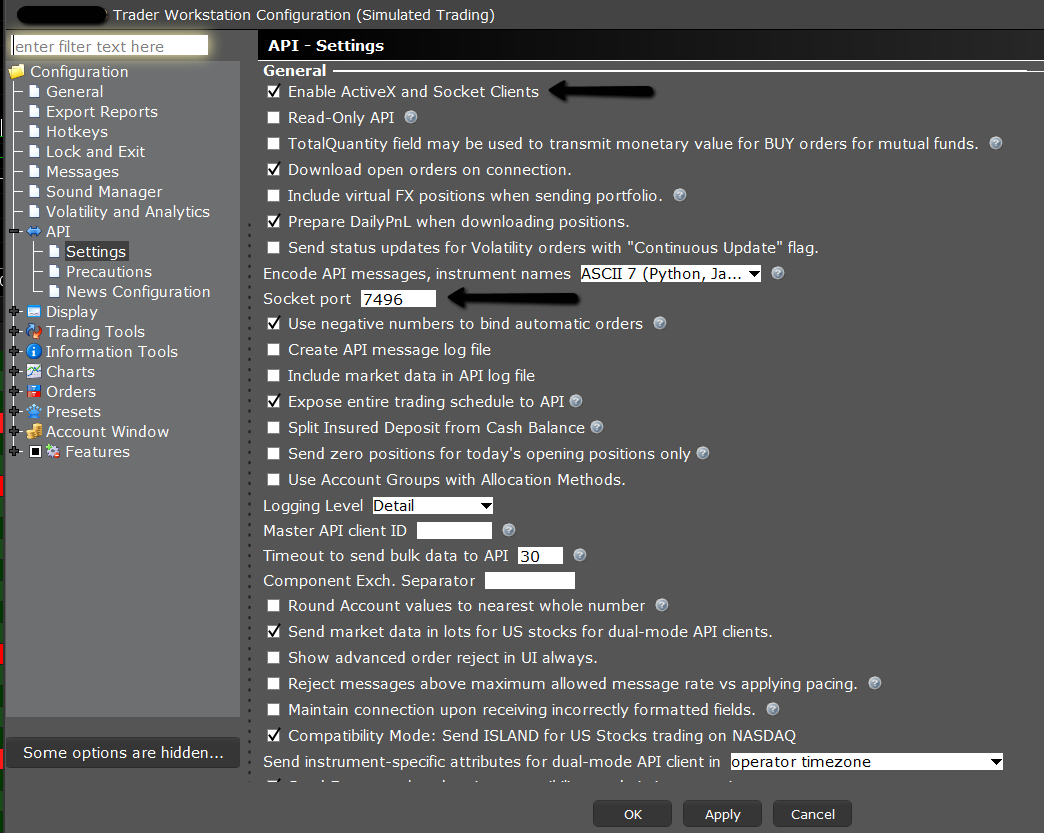
3. In TWS: **Global Configuration → API → Settings**:
- Enable **ActiveX and Socket Clients**
- Preferably keep **Read-Only API** **unchecked** (so features are not constrained)
- Port is typically **7496** (live) or **7497** (paper). SOAP uses either port, so the two are interchangeable in practice: just match the port set in TWS.
- SOAP default client id is typically **9**.
4. Launch SOAP → click the **IB connection** button (red IB icon) → **TWS → Connect**
- SOAP will attempt to start TWS if not already running, and show the login form.
5. **Shift+Click** the **Show Selected OA** button (top toolbar) to open a new **Options Analysis (OA)** window → pick an **expiry** → **Confirm Expiry** (or press **Enter**)
Prefer a fuller, screenshot-led example? See the [Initial Walk-Through](./initial_walkthrough.md.html): the same flow, worked through end to end with an SPX Put Broken Wing Butterfly.
---
## Installation prerequisites
- Windows 10 or later (64-bit) only: .NET 10 may allow porting SOAP2 to other non-MS platforms in the future.
- 8 GB RAM minimum (16 GB or more recommended)
- SOAP2 runs on **.NET 10** (runtime included in installer), but you can also install the runtime separately if needed:
- https://dotnet.microsoft.com/en-us/download/dotnet/10.0/runtime
- Latest stable IB TWS:
- https://www.interactivebrokers.ie/en/trading/trading-platforms.php?p=ibkr-desktop#platform-tabs
- IB API: included with SOAP2 (no separate install required)
Installation prerequisites are displayed during setup.
SOAP may be able to run on Linux via Wine, but this is not supported and may require additional configuration.
---
## Connection prerequisites (TWS)
SOAP2 connects to **Trader Workstation (TWS)** using the IB API. It also works with the IB Gateway.
In TWS's top menu: **Global Configuration → API → Settings**
Recommended local settings:
- Socket port: `7496` or `7497` (SOAP2 default client id is typically **9**)
- ✅ Enable **ActiveX and Socket Clients** (necessary)
- ✅ Download open orders on connection (optional)
- ✅ Download trades on connection (optional)
- ⛔ **Read-Only API**: **unchecked** (very much recommended)
- Allow connections from localhost only: optional (tunnel connections have not been fully tested)
- Expose entire trading schedule to API: optional (recommended)
If TWS is not running, SOAP2 can start it and show the login form.
To (re)connect from SOAP2: use the **IB** button → **TWS → Connect**.
Offline mode is possible, but not recommended without an initial successful IB connection (some features rely on initial sync).
NB: a tunnel connection generally uses localhost, however TWS is not local. The tunnel fakes the local connection to allow API access.
Tunnel connections have not been fully tested, so use with caution and report any issues.
IB API documentation (error codes):
- https://ibkrcampus.com/campus/ibkr-api-page/twsapi-doc/#error-handling (new)
- https://interactivebrokers.github.io/tws-api/message_codes.html (old yet valid)
### Order safety note
SOAP2 can prepare orders and send them to TWS, but **automatic transmission is disabled** for safety.
Prepared orders appear in the **TWS API** tab; you can then review and transmit them manually.
---
## What next?
- Learn the vocabulary (OA, SAT, Model vs Recorded trade): [Core Concepts](./core_concepts.md.html)
- Find your way around the windows and shortcuts: [Learning the Interface](./learning_the_ui.md.html)
- Connection trouble? See [Troubleshooting & Support](./troubleshooting_support.md.html)
# Getting Started: Install and Connect
**Level: Standard** • About 10 minutes • Next: [Core Concepts](./core_concepts.md.html)
This page takes you from nothing to a first live Options Analysis window: install SOAP2, set up TWS, connect, and open your first chain.
> **Videos:** [Installing SOAP2](https://www.youtube.com/watch?v=p0qo1rqZm2Y) (0:30) · [IB connection](https://www.youtube.com/watch?v=ew7PEqnJWeg) (0:24) · [SOAP2 first steps](https://www.youtube.com/watch?v=q3gJKk3oNgc) (1:30) · [All videos](./videos.md.html)
---
## Start here (60 seconds)
1. If not done already: install SOAP (or unzip and update/repair with the provided MSI file).
2. Install/launch **IB Trader Workstation (TWS)** (latest stable version).
3. In TWS: **Global Configuration → API → Settings**:
- Enable **ActiveX and Socket Clients**
- Preferably keep **Read-Only API** **unchecked** (so features are not constrained)
- Port is typically **7496** (live) or **7497** (paper). SOAP uses either port, so the two are interchangeable in practice: just match the port set in TWS.
- SOAP default client id is typically **9**.
4. Launch SOAP → click the **IB connection** button (red IB icon) → **TWS → Connect**
- SOAP will attempt to start TWS if not already running, and show the login form.
5. **Shift+Click** the **Show Selected OA** button (top toolbar) to open a new **Options Analysis (OA)** window → pick an **expiry** → **Confirm Expiry** (or press **Enter**)
Prefer a fuller, screenshot-led example? See the [Initial Walk-Through](./initial_walkthrough.md.html): the same flow, worked through end to end with an SPX Put Broken Wing Butterfly.
---
## Installation prerequisites
- Windows 10 or later (64-bit) only: .NET 10 may allow porting SOAP2 to other non-MS platforms in the future.
- 8 GB RAM minimum (16 GB or more recommended)
- SOAP2 runs on **.NET 10** (runtime included in installer), but you can also install the runtime separately if needed:
- https://dotnet.microsoft.com/en-us/download/dotnet/10.0/runtime
- Latest stable IB TWS:
- https://www.interactivebrokers.ie/en/trading/trading-platforms.php?p=ibkr-desktop#platform-tabs
- IB API: included with SOAP2 (no separate install required)
Installation prerequisites are displayed during setup.
SOAP may be able to run on Linux via Wine, but this is not supported and may require additional configuration.
---
## Connection prerequisites (TWS)
SOAP2 connects to **Trader Workstation (TWS)** using the IB API. It also works with the IB Gateway.
In TWS's top menu: **Global Configuration → API → Settings**
Recommended local settings:
- Socket port: `7496` or `7497` (SOAP2 default client id is typically **9**)
- ✅ Enable **ActiveX and Socket Clients** (necessary)
- ✅ Download open orders on connection (optional)
- ✅ Download trades on connection (optional)
- ⛔ **Read-Only API**: **unchecked** (very much recommended)
- Allow connections from localhost only: optional (tunnel connections have not been fully tested)
- Expose entire trading schedule to API: optional (recommended)
If TWS is not running, SOAP2 can start it and show the login form.
To (re)connect from SOAP2: use the **IB** button → **TWS → Connect**.
Offline mode is possible, but not recommended without an initial successful IB connection (some features rely on initial sync).
NB: a tunnel connection generally uses localhost, however TWS is not local. The tunnel fakes the local connection to allow API access.
Tunnel connections have not been fully tested, so use with caution and report any issues.

IB API documentation (error codes):
- https://ibkrcampus.com/campus/ibkr-api-page/twsapi-doc/#error-handling (new)
- https://interactivebrokers.github.io/tws-api/message_codes.html (old yet valid)
### Order safety note
SOAP2 can prepare orders and send them to TWS, but **automatic transmission is disabled** for safety.
Prepared orders appear in the **TWS API** tab; you can then review and transmit them manually.
---
## What next?
- Learn the vocabulary (OA, SAT, Model vs Recorded trade): [Core Concepts](./core_concepts.md.html)
- Find your way around the windows and shortcuts: [Learning the Interface](./learning_the_ui.md.html)
- Connection trouble? See [Troubleshooting & Support](./troubleshooting_support.md.html)